

Try it interactively and for free in our BFL Shop Demo.
Examples
- Single garment
- Multi-garment
- Model to Model
A single garment shown as a packshot. Use this when you have an individual product shot.
The person of image 1, maintaining exactly their face and pose, wearing the olive green bomber jacket with 'Black Forest Labs' branding of image 2.
Prompting tips
- Core prompt formula:
The person of image 1, maintaining exactly their face and pose, wearing the {YOUR GARMENT DESCRIPTIONS} of image 2. - A good default is even a static prompt like
The person of image 1, maintaining exactly their face and pose, wearing the garments of image 2.. But to get higher quality results, we recommend to add a concise description of the garments. Especially for complex garments, a detailed description can significantly improve the outcome.
You can for instance specify the fit and category of the garment like for example:- the oversized tee
- the cap with Keep FLUXing text
- the 7/8 length pants.
- When using another model shot as garment reference, only describe what should be tried on from that image and don’t specify in the prompt what should be kept from the model image.
For instance, if the garment reference image also shows a model wearing pants, but you only want to try on the top, your prompt could be:The person of image 1, maintaining exactly their face and pose, wearing the green jacket of image 2.
Reference images
General guidance
- Input images (both model and garment) up to 4 Megapixels are used as-is. The output resolution follows the model image, so
vto-v2can generate results up to 4 Megapixels. - Inputs larger than 4 Megapixels are not rendered at full resolution — they are automatically downscaled to a ~1 Megapixel target while preserving aspect ratio. If you want a high-resolution result, downscale oversized inputs to at most 4 Megapixels yourself before submitting.
- For the best balance of quality and latency, keep the model image and the garment image at around 1 Megapixel. Larger inputs produce higher-resolution outputs, but increase latency.
- Some artifacts from existing clothing may be retained in the output. If you are consistently seeing this, you can try preprocessing the model image to get a more neutral base for the try-on. A neutral base could mean just wearing tight-fitting, plain clothing.
- For the garment reference, clean, well-lit images with a clear view of the garment details work best. Both packshot and on-model references are supported, but packshot references with a plain background tend to produce the best results.
Designing the garment image
If you want to generate an image with more than one garment, merge them into a single canvas first. This reduces extra file handling overhead and optimizes for latency.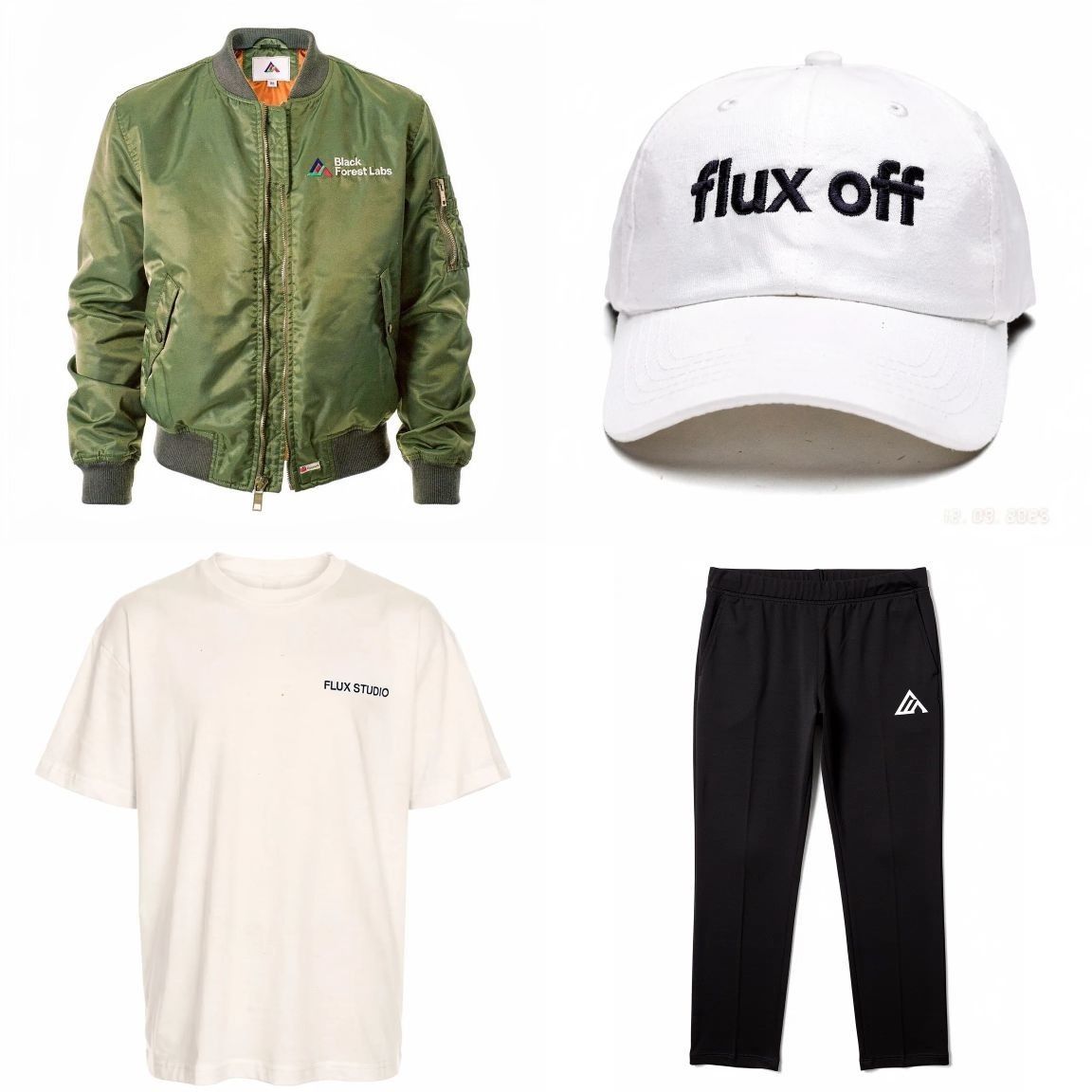
Multiple garments merged into a single canvas before being sent as the garment reference
Endpoint
Submit a try-on job:Regional endpoints
To reduce latency, you can pin requests to a specific region by swapping the host:https://api.eu.bfl.ai/v1/flux-tools/vto-v2— Europehttps://api.us.bfl.ai/v1/flux-tools/vto-v2— US
polling_url returned in the submit response will match the region you submitted to — always poll the URL returned in the response rather than rewriting the host.
Follow the regional endpoints guide for more information on the regional endpoints and how to use them.
Versions
vto-v2 improves on vto-v1 in three areas:
- Face preservation — markedly better retention of the model’s identity and facial features in the try-on result.
- Garment detail — minor gains in the fidelity of garment textures, prints, and trims.
- Higher-resolution output — input images up to 4 Megapixels are used as-is and the result follows the model image’s resolution.
vto-v1only kept inputs up to 2 Megapixels as-is. On both versions, oversized inputs are downscaled to a ~1 Megapixel target.
Migrating from v1
The request and response formats are identical between versions — swap the endpoint path fromvto-v1 to vto-v2 and no other changes are required.
Quick start
The API uses an asynchronous workflow:1
Submit a VTO request
POST a person image and one or more garment images, together with a styling prompt, to the model endpoint.
2
Poll for the result
Use the returned
polling_url to check status until the image is ready.Request parameters
Useperson + garment as the minimum payload.
Response format
Initial response
Polling response (success)
status is "Ready", use result.sample.
For the full list of HTTP status codes and polling response types returned by the API, see the Errors reference.